




Safe Connectivity: Digital Security and Financial Services on the Connecting Europe Express
A long European rail trip is, among other things, a long stretch of time spent online — checking your bank, logging into work, booking hotels, streaming on the move. Every one of those actions sits on a network you do not control, on a device more visible to strangers than at home, across borders where the rules quietly change. This guide is the practical version of staying safe online while travelling — risks are real but manageable with a little preparation.

The risks worth taking seriously
Most online risk on the road falls into one of four categories. Knowing which is which makes it much easier to defend against.
| Risk | What it actually is | How likely you are to meet it |
|---|---|---|
| Insecure Wi-Fi | Open networks at stations, cafés, and hotels that allow others on the same network to observe traffic | High — almost guaranteed on a multi-city trip |
| Account hijacking | Someone gaining access to email, banking, or social accounts via stolen credentials or session tokens | Moderate — depends on your habits |
| Card fraud | Skimmed cards, dodgy ATMs, or compromised point-of-sale terminals | Moderate — concentrated in tourist areas |
| Geo-restrictions | Legitimate services that simply will not work, or work differently, outside your home country | Very high — affects almost everyone at some point |
The first three are about security. The fourth is about access — it is not really a “threat” in the criminal sense, but it shapes the practical experience of using the internet abroad almost as much as the others combined.
Public Wi-Fi on trains, in stations, and at hotels
The Wi-Fi on board Eurostar, ICE, and most major European long-distance services is genuinely useful — patchy in tunnels, generally fine in open country, and adequate for email, messaging, and light browsing. It is also a shared network, which means a few basic precautions are worth taking automatically.
A short checklist for any public Wi-Fi:
- Use HTTPS for everything. Modern browsers warn you when a site is not encrypted; treat that warning as a hard stop. Banking, email, and any account login should be HTTPS by default.
- Turn off automatic connection to unknown networks. Your phone will happily reconnect to anything called “Free WiFi” — including a network set up by someone sitting two seats away.
- Disable file sharing and AirDrop / Nearby Share for the duration of the trip. Useful at home, a small attack surface in public.
- Use a VPN for anything sensitive (see the next section).
- Keep your software up to date. A patched device is dramatically harder to compromise than a six-month-out-of-date one.
- Avoid using shared computers at hostels, business centres, or print shops for anything more than printing a boarding pass. You have no idea what is installed on them.
For most travellers, the risk on a Eurostar or DB connection is low — these are professionally run networks, not coffee-shop Wi-Fi. But the principle “treat every public network as though someone might be watching” is a good habit on every trip.
VPNs: what they actually do, and when to use one
A VPN (Virtual Private Network) creates an encrypted tunnel between your device and a server somewhere else, and then routes your traffic through that server. To anyone watching the network you are connected to — the train’s Wi-Fi, the hotel router, a café hotspot — your traffic looks like an unreadable stream going to a single destination. To the websites and services you are using, you appear to be coming from the location of the VPN server, not your physical location.
That dual function (encryption and virtual location) is why VPNs are genuinely useful for travel:
- Security. On any untrusted network, a VPN means your traffic cannot be casually observed by anyone else on the same Wi-Fi.
- Access. If you connect through a UK server, services that recognise UK users will continue to behave the way they do at home — your banking app, your streaming subscriptions, your news sites, and your entertainment platforms.
- Privacy. Your internet service provider (or the train’s network operator) can see that you are using a VPN, but cannot see what you are doing inside it.
A few practical points worth knowing:
- Pick a paid service rather than a free one. Free VPNs make their money somehow, and that “somehow” is usually your data. Reputable paid services charge a few pounds a month.
- Install it before you leave. Some VPN provider websites are blocked in some jurisdictions; downloading the app while still at home avoids the problem entirely.
- Test it before you go. Connect to a UK server from your living room, confirm that everything works the way you expect, and then leave the settings alone.
- Understand local rules. VPNs are legal in every EU country and in the UK, but a small number of countries elsewhere in the world restrict or ban them. If your trip extends beyond Europe, check before you go.
- Use the “always-on” setting on your mobile device if it offers one — it stops the brief window of unprotected traffic that occurs when an app starts up before the VPN connects.
For a British traveller crossing the continent, a VPN is the single most useful piece of digital infrastructure to carry. It costs less per month than a coffee, and it solves both the security and the access problem at the same time.
Two-factor authentication and account hygiene
Most account breaches on the road do not involve sophisticated hacking. They involve a stolen password, a re-used password, or a one-time code sent to a phone number that no longer works because you have switched to a travel eSIM.
A short pre-trip checklist that pays for itself many times over:
- Turn on two-factor authentication (2FA) on your email, banking, and any account containing financial or personal data. Use an authenticator app (Google Authenticator, Authy, or your password manager’s built-in version) rather than SMS where possible — SMS 2FA breaks the moment you switch SIMs or lose phone signal.
- Save backup codes for your most important accounts somewhere accessible but secure (a password manager is ideal). If your phone is lost or stolen, these are the only thing standing between you and being locked out of your own life.
- Use a password manager. One strong, unique password per account, all stored behind one very strong master password and a 2FA second factor.
- Tell your bank you are travelling. Most modern UK banks no longer require it, but a quick note via the app prevents the occasional precautionary card block.
- Know how to remotely wipe your devices. Both iOS (Find My) and Android (Find My Device) support this. Set it up before you leave.
The mindset to bring to the trip is simple: assume that any single device or account could be lost, stolen, or compromised, and design your setup so that no single loss is catastrophic.
Using UK debit and credit cards across Europe
The good news is that the day-to-day experience of paying with a UK card in Europe is unchanged by Brexit. Contactless works almost everywhere, Apple Pay and Google Pay are widely accepted, and the underlying card networks (Visa and Mastercard) operate exactly as they did before.
The less-good news is that small fees have crept back in for many UK cardholders. The headline ones to watch:
| Fee type | What it is | How to avoid it |
|---|---|---|
| Non-sterling transaction fee | A percentage charged by your card issuer on any non-GBP transaction | Use a card that explicitly waives this fee abroad |
| ATM withdrawal fee | A flat or percentage fee for cash withdrawals in foreign currency | Withdraw larger amounts less often; use a fee-free travel card |
| Dynamic Currency Conversion (DCC) | The terminal offers to charge you in GBP at a poor exchange rate | Always choose to pay in the local currency |
| ATM operator fee | A fee charged by the machine itself, separate from your bank | Use bank ATMs rather than private “Euronet”-style machines |
A few practical habits that consistently save money:
- Carry at least two cards from different networks (one Visa, one Mastercard, ideally from different banks) in case one is lost or temporarily blocked.
- Keep one card separate from the others — in a different pocket, a hotel safe, or a partner’s wallet — so that a single theft does not leave you stranded.
- Use a dedicated travel card for foreign-currency spending. Several UK fintechs (and a growing number of high-street banks) offer cards with no non-sterling fees and the real interbank exchange rate.
- Keep some local cash for taxis, tips, small cafés, and the rare cash-only situation.
- Check your statement regularly. Even on a holiday, a daily two-minute glance at the app catches most fraud within hours rather than weeks.
If a card is lost or stolen, freeze it from your banking app immediately (almost every UK bank now supports this instantly) and order a replacement to your home address — not your hotel — to collect on return.
Accessing your favourite services from abroad
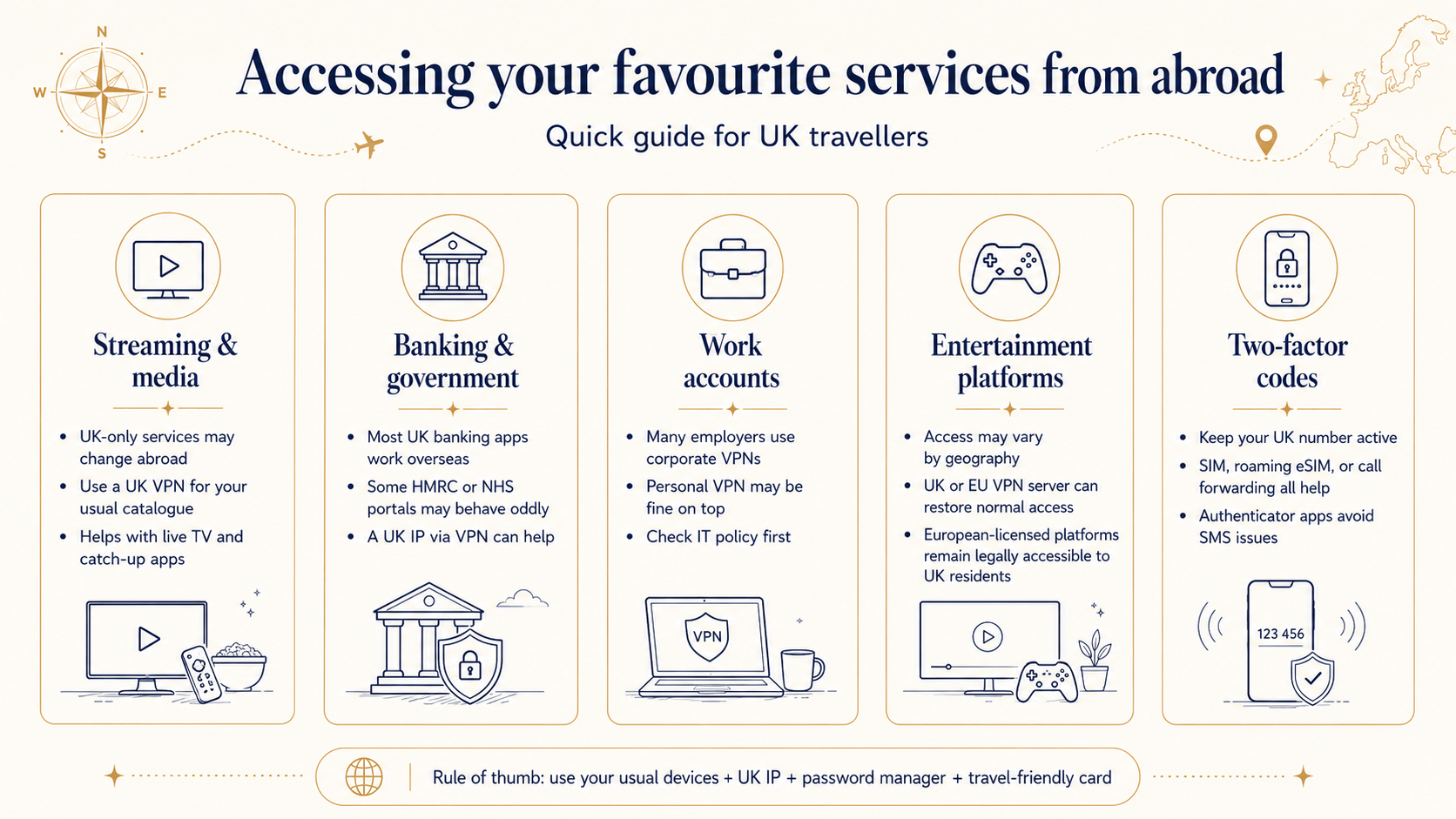
Once the security basics are in place, the more common day-to-day problem is access rather than safety. Streaming services may show a different catalogue, news sites may serve a different edition, and some entertainment platforms may behave differently or not load at all depending on where their servers think you are.
A few categories worth thinking about before you travel:
- Streaming and media. BBC iPlayer, ITVX, Channel 4, and similar UK-only services are licensed for use within the UK. Connecting via a UK VPN server keeps your usual subscriptions working as expected.
- Banking and government services. Most UK banking apps work fine internationally, but a few government services (HMRC, certain NHS portals) occasionally behave oddly from foreign IP addresses. A UK VPN connection sidesteps the issue.
- Work accounts. Many employers route corporate access through their own VPN; using a personal VPN on top is usually fine but check your IT policy.
- Entertainment platforms. British travellers who use online entertainment platforms — including the European-licensed gaming sites that remain legally accessible to UK residents — generally find that they continue to work normally while abroad. Where a particular platform restricts access by geography, a VPN connection to a UK or EU server brings the experience back into line with the home setup. The licensing point is worth repeating: an MGA, Gibraltar, or Isle of Man-licensed operator is operating under European law, and a British traveller is not breaking any UK rule by using such a platform from anywhere on the continent.
- Two-factor codes. If a code is sent to your UK mobile number, make sure that number is still active (your physical SIM, a roaming eSIM, or call-forwarding all work). Authenticator apps avoid the problem entirely.
The general rule of thumb: anything that worked at home should work the same way abroad if your traffic comes from a UK IP address and you are using your usual devices. The combination of a paid VPN, a password manager, and a travel-friendly card removes nearly every friction point a British traveller is likely to encounter.
Physical security: the unglamorous half of digital safety
Almost every “digital” security incident on the road has a physical component. Phones are stolen, laptops are left on luggage racks, bags are opened at busy interchanges. A few small habits make an enormous difference.
- Set a strong device lock — a six-digit PIN at minimum, biometrics for convenience, and auto-lock set to one minute or less.
- Encrypt your devices. This is on by default on modern iPhones, Android phones, and most laptops, but worth verifying before a trip.
- Use a cross-body bag on platforms and in crowded stations rather than a backpack. It is harder to open without you noticing.
- Keep one charging cable and adapter in your hand luggage at all times. A dead phone is not a security risk in itself, but it is the moment most travellers reach for a public charging port — which can be a risk if the port is compromised. A small power bank avoids the problem.
- Treat the seat-back pocket as the most dangerous place on a train. It is where almost every “I left my phone on the train” story begins.
A short pre-departure checklist
Bringing it all together, a checklist you can run through the evening before a rail trip:
VPN installed, tested, and set to auto-connect on phone and laptop.
Password manager set up with master password memorised and 2FA enabled.
2FA backup codes saved for email, banking, and any critical account.
At least two cards in different pockets, ideally including one fee-free travel card.
A small amount of local cash for the first 24 hours.
Banking and travel apps updated to their latest versions.
Find My Device / Find My iPhone confirmed working.
Roaming or eSIM confirmed active for the first country on the route.
Devices charged, plus a power bank for the day.
Travel insurance details stored somewhere you can find them offline.
None of the above takes more than half an hour the first time and ten minutes thereafter. The pay-off is a trip on which the internet works the way you expect, your money does what it is supposed to, and the things that might go wrong almost certainly do not.
The Connecting Europe Express idea — moving freely across a continent — works best when the digital side of the journey is as frictionless as the physical one. A small amount of preparation turns “online safety while travelling” from a worry into a non-event, and lets the trip itself be the thing you spend your attention on.
Resent news